The Scrapbook School/Fall Into Autumn Scrapbooking Cut Files Kit

  • $19.99

Fall Into Autumn Scrapbooking Cut Files Kit

  • Closed
  • Download

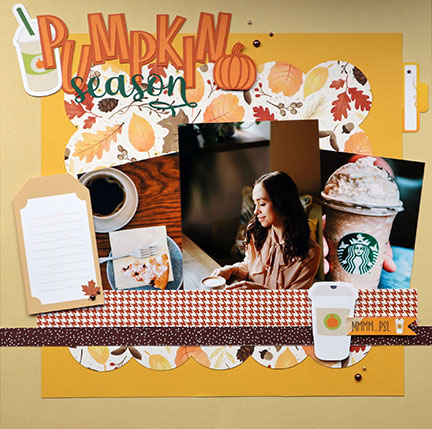
A set of Cricut scrapbooking templates perfect for creating fall-themed projects that capture the essence of the season. The kit has an ebook with easy-to-follow instructions for making 9 different scrapbooking, gift, and home decor projects.

Unlock Effortless Scrapbook Design!

If you're tired of feeling stuck, frustrated, and lacking the inspiration to create beautiful scrapbook layouts,
then "Fall Into Autumn" is the perfect solution for you!

What's Included:

Pre-Designed Layouts: This kit includes three pre-designed scrapbook layout cut files plus 25 SVGs and 14 PNGs. Every element is thoughtfully created to inspire your creativity. No more staring at blank pages, wondering where to begin!

Easy-to-Follow Project Guide: Say farewell to confusion. Our 30-page project guide will walk you through 9 scrapbooking, gift, and home decor projects with clear assembly instructions. Plus, I've included links to projects in Cricut Design Space, making your crafting time simple and quick.

Master Cricut Design Space Techniques: Have you ever wished you could effortlessly execute Cricut Design Space functions like print-then-cut? The project guide includes four quick tutorials on specific Cricut techniques used with the projects. No more struggling; you'll be a Cricut pro in no time!

Color Magic: I know the importance of color in your scrapbooking. That's why I've included 10 Fall color palettes to try. You can customize your designs quickly and create pages that resonate with the warmth of autumn.

Resources Galore: I provide additional resources for where to buy materials, tips, and how-to's, ensuring you continue to grow and expand your scrapbooking and Cricut skills.

No more frustration, no more wasted time, and no more feeling stuck. "Fall Into Autumn" is your ticket to effortless scrapbooking.   Get your kit today!

KIT BONUS

Project Guide

This project guide is included in the kit:

  • 8 scrapbooking, gift, and home decor projects with assembly instructions, including links to some projects in Cricut Design Space

  • 4 quick guides on specific Cricut techniques used with the projects

  • 10 Fall color palettes to try so you can customize your designs and

  • Resources for materials, additional tips, and how-to’s.

Here's What You Can Make!

This is just a sample of the projects included in the project guide.

Frequently asked questions

You’ve got questions. I’ve got answers. Need to know more?
Please don't hesitate to email me at info@thescrapbookschool.com.

Can I use this kit with a Cricut Joy or Joy Extra?

I don't recommend this kit for Joy or Joy Extra users because it was designed specifically for Cricut Explore and Maker machines that use at least a 12" x 12" cutting mat.

Will this kit work on a Silhouette die cutting machine?

Although the kit is designed for Cricut users, it has also been tested on a Silhouette Cameo 4. You may use this kit if your cutting machine supports SVG and PNG file formats and can cut up to 12" x 12" size.

What files are included in this kit?

There are 25 SVG and 14 PNG files. The SVG files are multi-layered, which means you can manipulate layers by turning them on/off, changing colors, using pens, adding foil effects, or debossing.

What kind of projects can I make?

You can create three scrapbooking layouts, a set of tags, a banner, and more. We provide a direct link to the file in Cricut Design Space for some projects.

Am I limited to making only the projects in the guide?

No, you can use your creativity to make anything you like! The kit elements are customizable, and the projects in the guide are there to inspire you and help you learn various Cricut techniques.

Do I need advanced Cricut Design Space skills to use this kit?

To use this kit, you don't need to have advanced Cricut Design Space skills. The included project guide will teach you some intermediate to advanced Cricut skills. However, you should be familiar with basic Design Space operations such as launching the program, setting up a new project, understanding the Operations menu, and managing the Layers panel.

What Cricut techniques will I learn?

The guide features techniques such as Print-Then-Cut, Flatten, Attach, Embossing, using scoring tools, and Cricut pens.

How do I access the projects in Cricut Design Space?

I provide direct links to a few projects in Design Space in the guide. Click on the link, and the program will open. Some projects require a subscription to Cricut All-Access to use images like tag bases or scalloped borders. If you don't have a subscription to use an image, you can easily replace it with a non-All-Access image from the Design Space image library or one of your own.

Do the projects you link to in Design Space use elements from the kits?

Yes, the projects in Design Space use images from the kits. You will need to use the kit elements to recreate the projects as shown.

However, some of the images incorporated in the projects might require a Cricut All-Access subscription, such as unique shapes or fonts. If you don't have access to such images or fonts, you can easily replace them with other non-All-Access images from the Design Space image library or upload your own.

Can I get a refund if I don't like the kit?

No refunds can be granted due to the non-returnable nature of digital products once they're downloaded.

Video Demo

https://www.youtube.com/watch?v=_S9-Ad8DPEc